I am looking for the article that was in FSM, or any personal suggestions, about how to create the illusion of spinning props out of circle of plastic.
Here is how I do it with a graphics program and homemade decals. I scan the kit prop. Then I load the image into a photo editing program such as Adobe Photoshop Elements. I do a rotational blur on it (rotating about center). This blurs the prop (I use quite a bit of blur). Then I reduce the transparency down to about twenty to thirty percent. I then print this on inkjet decal paper. I then apply the decal to a disk I have cut out to size. Makes a better image of a prop than any of the scratching or fogging tricks I have seen.
I hope to do an article later for FSM on displaying an aircraft in flight, but it will be a number of months before I even start, so thought I’d post basics here now.
.
You could download and scale an image of a prop blur and take it to an office supply store and have them print it on OHP (overhead Projector)Film. It’s clear so it would only work on black or colored prop blurs.
Photo etch prop blue in use:

I personally like the Prop Blurs. They will look very realistic if painted correctly
So what is your method to paint Prop Blurs? I’ve got a set for a 1/48 B-25 that I’ll use whenever I get around to pulling that kit out of the stash. My plan was to attempt to lighten the color gradually as one moves away from the body of the prop blades, but I haven’t given much thought about how this was going to be accomplished.
Don
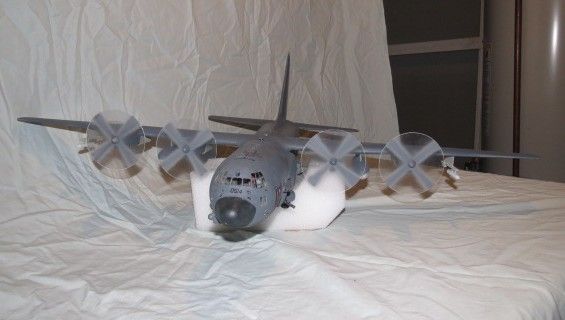

The spinners are tedious but easy. I have an industrial strength locking compass/divider from a yard sale. I drilled a small hole in a piece of acetate larger than the prop. I measured the radius of the prop and slowly rotated the compass until it was cut through. A sharper tip would have made faster work. I made an extra and taped a prop to it and airbrushed a sample prop then used that on the others.
I was afraid I’d mess up the location of the prop spinners when I attached them to the circles, needing to center them on the circle and align them with the engine housing. There’d be one shot at each. Failure meant a lot more work.
I replaced the kit prop axles with 1.5 mm aluminum tube, though brass rod would work, too. I filled the spinners from the back with Miliput and lined them up with the new axles so there was a central locator hole. The I sanded the spinner smooth removing the prop bosses then painted them the same color as the rest of the plane. .
Pop the acetate on, align the prop shadows and attach the spinner with a bit of Zap-A-Gap. DONE!
[
O Boy!! Two of my strongest traits…, steady hands and patience. Can’t wait!
Well, when I do start the kit, I’ll be sure to post a few photos.
Don
I guess this isn’t as nice as a prepared one, but I did this a year or so ago by taking some of that annoying plastic that items are packaged in,( you know, that stuff that you cuss while trying to get your goodies out of) and airbrushing a blur on it. I’ll have to try the computer generated ones some day soon.
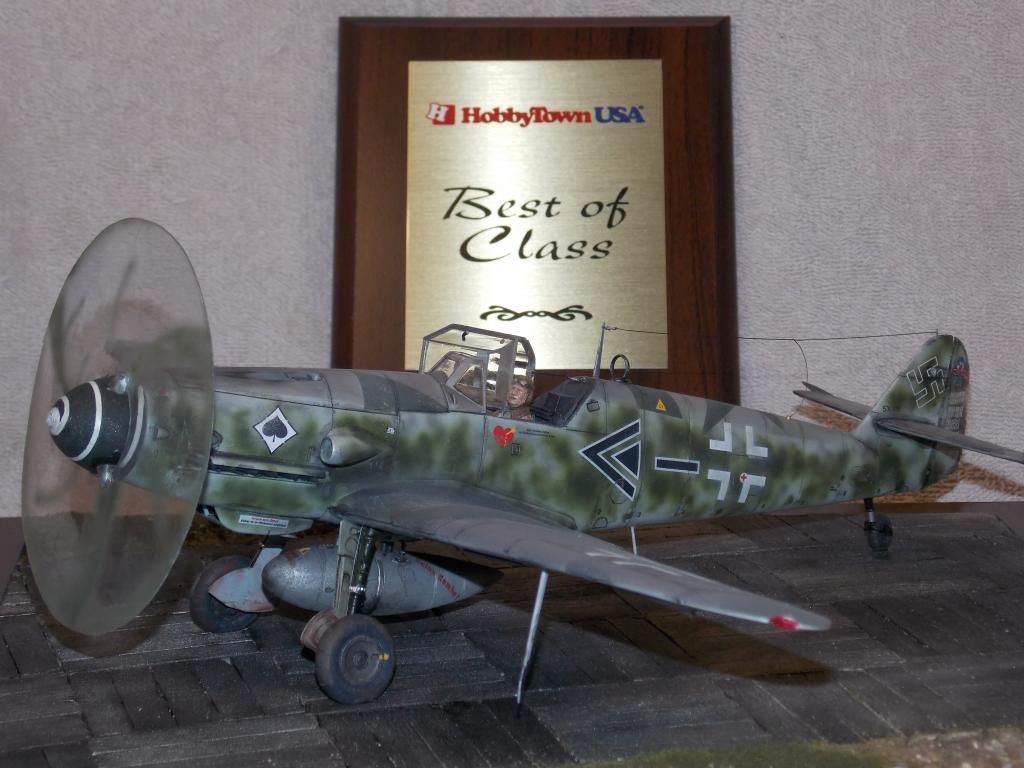
Doug (RR)
I would think an airbrush would be best for painted blurs. You want the blurs to be translucent, not full contrast as in color of stationary prop. While drybrushing can do translucent, I find airbrush to be easier. Plus, you want indistinct edges.
I have to say, I’ve yet to see a prop blur effect that looks convincing to me. So I continue to build just using the stock props and imagine it’s a 3D image captured with a very fast shutter speed!
Hey :
Idea !
How about this . Take a picture of one prop spinning in a fan .Then copy to your printer for multiple images and do it on sheet acetate ! Problem solved , Spinning prop properly represented with a dupe of the real spinning prop from the model.
Ah, the problem is the result is VERY sensitive to shutter speed, so you need to bracket exposure time and select the effect you want.
It will never work exactly like we see, because the eye works different than any camera type I am aware of- cameras, even video ones, are a sampled data system while the eye does a continuous exposure and processes the photons in a unique way.