What gives? I can’t log out when I want to.
I duplicated this.
I clicked the Logout link in the upper right-hand corner of the page:

I was not logged out.
Looking in the developer’s tools, the Console tab, I saw these 4 errors recorded, when I clicked Logout:
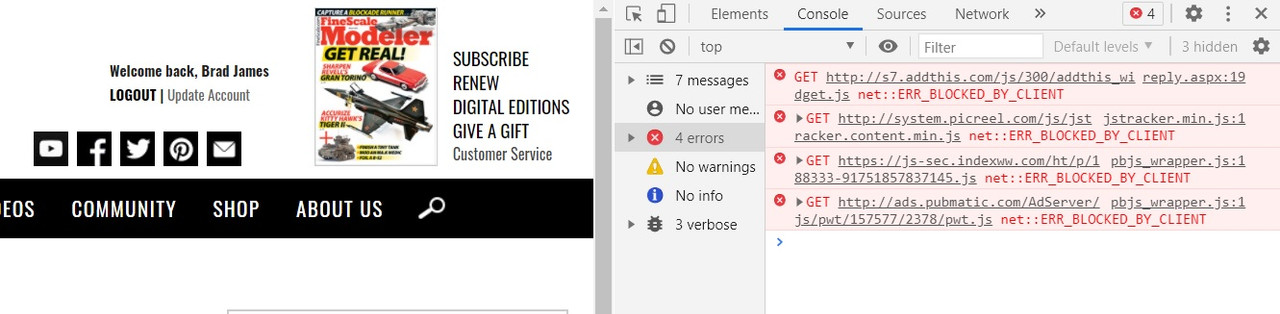
I’m running Chrome, Version 88.0.4324.146, Windows 10, on a Lenovo ThinkPad.
I never logout because I fear that I will not be able to log back in.
I keep seeing this thread and haven’t responded, but this hasn’t been a problem for me.
Bill
It’s never been a problem for me, either, because I don’t usually log out of my FSM session, on this machine. But I clear my browser cache on it, several times a day, though, so the cookies get deleted.
I found an older post about this issue, from June 2019, so it’s been with us a while. It’s akin to the issue with logging in, in which the forum member submits his username and password, the login appears to complete, but he’s not logged in. The workaround there, too, was to clear the browser cache and delete FSM cookies, then try again.
I know the LOGOUT icon is there. Everytime I click on it to log out, it won’t let me log out.
As Baron says, this is a cookie issue and has to do with the community plaftform itself. It appears that the issue most often occurs with Chrome, but has cropped up with other browsers, too. As with other challenges on the forum, we have a list and we are triaging with respect to what is most important. Right now, the 403 Error and the iOS conundrum run at the top of the list. Usually, clearing your browser’s cache will do the trick and log you out.
Tim
Never figured that you didn’t know it.
I test software for a living, so when I saw your post, I thought I’d try it myself. And I just recorded my test’s specifics, to help the developer who gets assigned to resolve this.
Is there a way to get the no notifications issue bumped up the chain?
Running that test was a good idea. I may do that too as I cant log out sometimes and I also have to log in twice sometimes…
didnt run the test yet, i fumble on an ipad, but i got this when logging out on ipad ios 14.4.2, firefox daylight 33.0 (4119)…

What gives? I can’t log in on my MacBook Air (403 Forbidden error).
I think that I’d rather have the log out problem than the log in problem.
The only advice I have, as a workaround, is to clear the browser cache and try again. It is a real nuisance.
Thanks for the suggestion. I cleared cookies, browser cache and history. I still can’t log in on my MacBook Air. However, I can log in on my Windows PC.