Thanks you to everone who showed interest in my work. I am new to this and can not figure out how to upload pictures. Could someone please help me???
Nice avatar, Cpt.!
You need a photo hosting service like www.photobucket.com. It’s free and not difficult to us. No, I don’t own stock!
Then you need to upload your pics to that. It’s done by clicking “upload,” then selecting photos from your computer.
Once you have your photos uploaded to the service, you click on the little cogwheel (on the photobucket image), and it brings up “get links.” Open that and copy “Direct.”
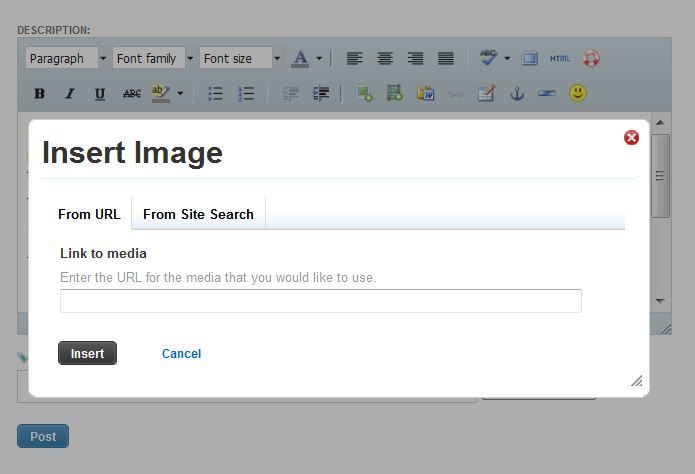
Then come over to FSM here, and click on the “image” icon that appears with “rich text formatting.”
Paste the copied “Direct” link from photobucket, hit the insert button, and your photo should post.
It’s easiest to do this with two browser windows open at once–one here at the Forum, the other at your photohosting site.
Good luck!
-
This works best if you open 2 windows: 1 in FSM and 1 in Imageshack, Photobucket, Dropbox, et al. Go to the photo site window and highlight and copy the “Direct Link” address. Go to the FSM widow containing your unfinished post. Go to the menu bar above your post, the icon that looks like a cellphone, the 2nd tier of the message control bar, the ELEVENTH icon It says ‘Insert Media’… CLICK IT. Paste the Direct Link address into the appropriate space. Then hit insert.
-
Wait for the FSM site to show the photo, etc. etc.
The “rich formating” is essential. The icons only show when you select that option.
Photobucket seems to have a lot of intermittent problems, or maybe it’s just my computer that doesn’t llke the program. Last time I tried to use it, it locked up my computer for good and the only way I could restart it was turn off the power and then restart Windows and hope it would come back to life. It did.
Many other times, I have used Photobucket without any problems.
That’s interesting, Chuck. Haven’t had trouble with photobucket recently, but there were a lot of problems when they switched to a newer version. I hope they get their issues solved. They seem easier to use than some others.
Yeah, photobucket is NOT very friendly with me either. It’s always given me a hard time. Or was anyway. I gave up. I use Shutterfly for my online pic storage. no problems. Oh, and it helps BIG time if you’re using Google Chrome as your browser. Poor Internet Explorer just cant keep up in today’s internet.
So, when replying in or creating new post in FSM, be sure to have chosen the “rich formatting” option. Then go to where you’ve stored your pics online (Shutterfly, Flickr, Photobucket…), open the pic you want to share and right click on it, choose “copy image” then go back to FSM post and right click at the spot you want to place pic and choose “paste”. Do that for each pic you want to share.
OMG!!! Been trying to figure this out for a whole week!!! thanks!! 